Remesh
Regenerate a model's mesh topology, optimizing face count and arrangement so AI-generated meshes become production-ready.
TL;DR
-
Regenerates a model's mesh topology, optimizing face count and face arrangement.
-
You can specify a target polygon count to balance quality and performance.
-
AI-generated models typically have excessive triangles and irregular topology — Remesh makes them production-ready.
-
Required before 3D printing to ensure a watertight (hole-free, closed) mesh.
When to Use
-
The model's face count is too high and needs to be reduced (games: under 50K, mobile: under 10K).
-
The model needs to be 3D printed — watertight mesh is mandatory.
-
You need cleaner topology for downstream operations (UV unwrapping, animation rigging, etc.).
When NOT to Use
-
The model already has acceptable face count and good topology.
-
You're in the concept exploration phase — Remesh only the final asset.
Step-by-Step
-
Select the target model.
-
Enter the Remesh tool.
-
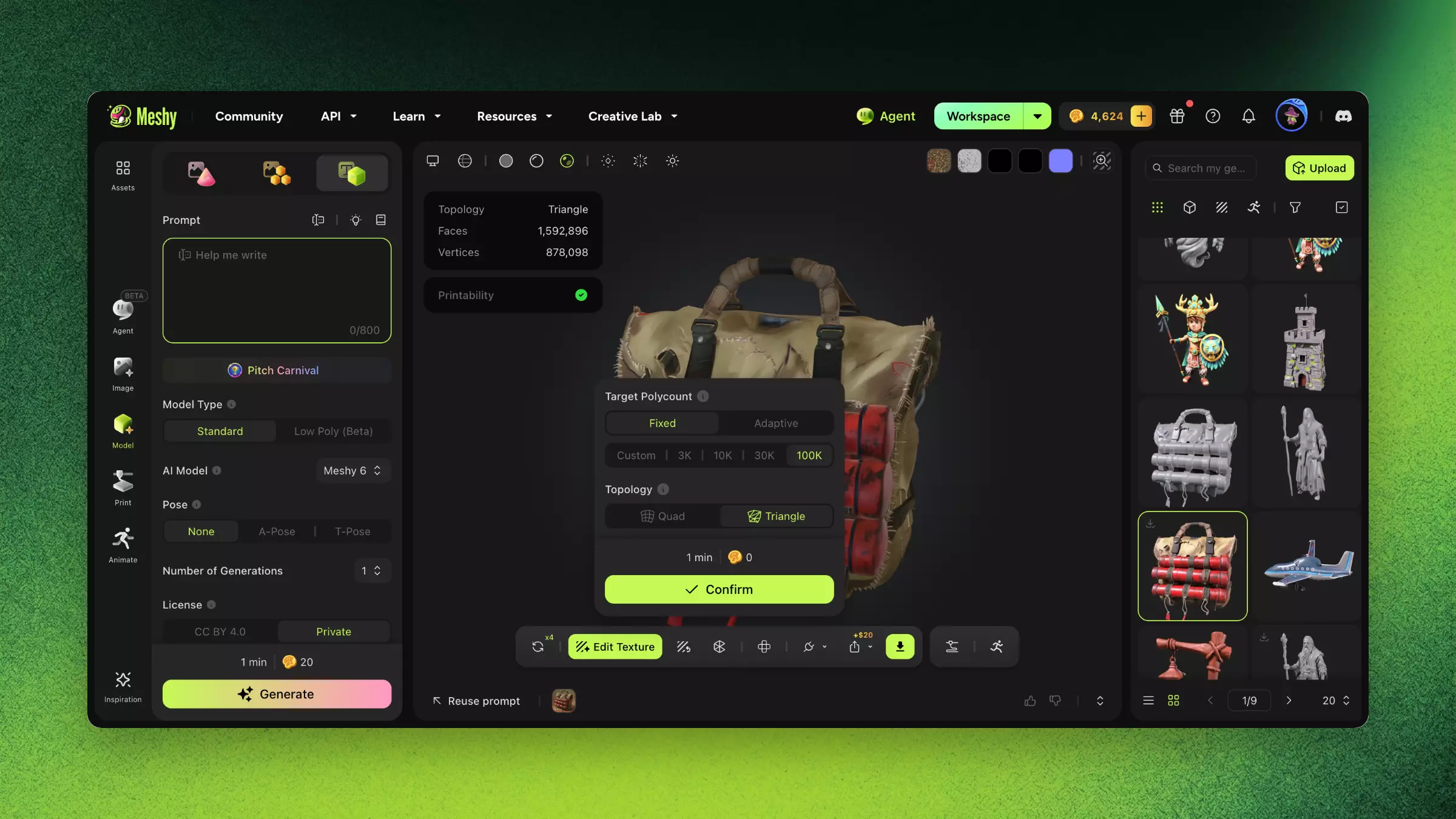
Set the Target Polygon Count (e.g., 10K faces).
-
Click Remesh and wait for processing.
-
Compare the original and remeshed model: check detail preservation.
-
If satisfied, replace or save as a new model.
Settings & Tradeoffs
| Target Faces | Use Case | Detail Loss | File Size |
|---|---|---|---|
| < 5K | Mobile AR, casual games | Noticeable | Small |
| 5K – 20K | Mobile games, web viewers | Minor | Medium |
| 20K – 50K | PC/console games | Minimal | Medium |
| 50K – 100K | High-quality renders | Very low | Large |
| > 100K | Film/cinematic | Negligible | Very large |
Troubleshooting
| Symptom | Cause | Fix |
|---|---|---|
| Severe detail loss | Target face count too low | Increase target count; find the quality-performance balance |
| Holes after remeshing | Original mesh has non-manifold edges | Try a higher face count, or repair the original mesh first |
| Small accessories disappear | Uneven face budget distribution | Remesh complex models part by part |
FAQ
- What does Remesh do in Meshy?
- Remesh regenerates a model's topology, optimizing face count and arrangement so AI-generated meshes become production-ready.
- How many polygons should a game model have?
- Aim for under ~50K faces for PC games and under ~10K for mobile; set your target polygon count in the Remesh tool.
- Do I need to Remesh before 3D printing?
- Yes. Remesh can produce a watertight (hole-free, closed) mesh, which is mandatory for successful 3D printing.
- Will Remesh reduce my model's detail?
- Lower targets trade some detail for performance; compare the original and remeshed versions and raise the target if needed.
- When should I Remesh in my workflow?
- Remesh the final asset before UV unwrapping, texturing, or rigging — skip it during concept exploration.
Related Links
-
AI Texturing — Retexturing after Remesh produces better results
-
Unwrap UV — UV needs to be regenerated after Remesh
-
Rigging — Clean topology is essential for rigging