AI Image Generation
Generate 2D images from text descriptions, optimized as input for Image to 3D — giving you precise visual style control before entering the 3D pipeline.
TL;DR
-
Generate 2D images from text descriptions, optimized as input for Image to 3D.
-
Ideal when you have no reference image and want to quickly generate concept art.
-
Outputs high-quality PNG, optimized for 3D conversion (clear subject, clean background).
-
Difference from Text to 3D: here you generate 2D first, then convert to 3D — giving more precise visual style control.
When to Use
-
You have a concept but no reference image and want to visualize it before converting to 3D.
-
You want fine-grained control over 2D visual style before entering the 3D pipeline.
When NOT to Use
-
You already have a reference image → Go directly to Image to 3D
-
You want a one-step text-to-3D result → Use Text to 3D
-
You want a guided creative process → Use 3D Agent for brainstorming and concept exploration
Step-by-Step
-
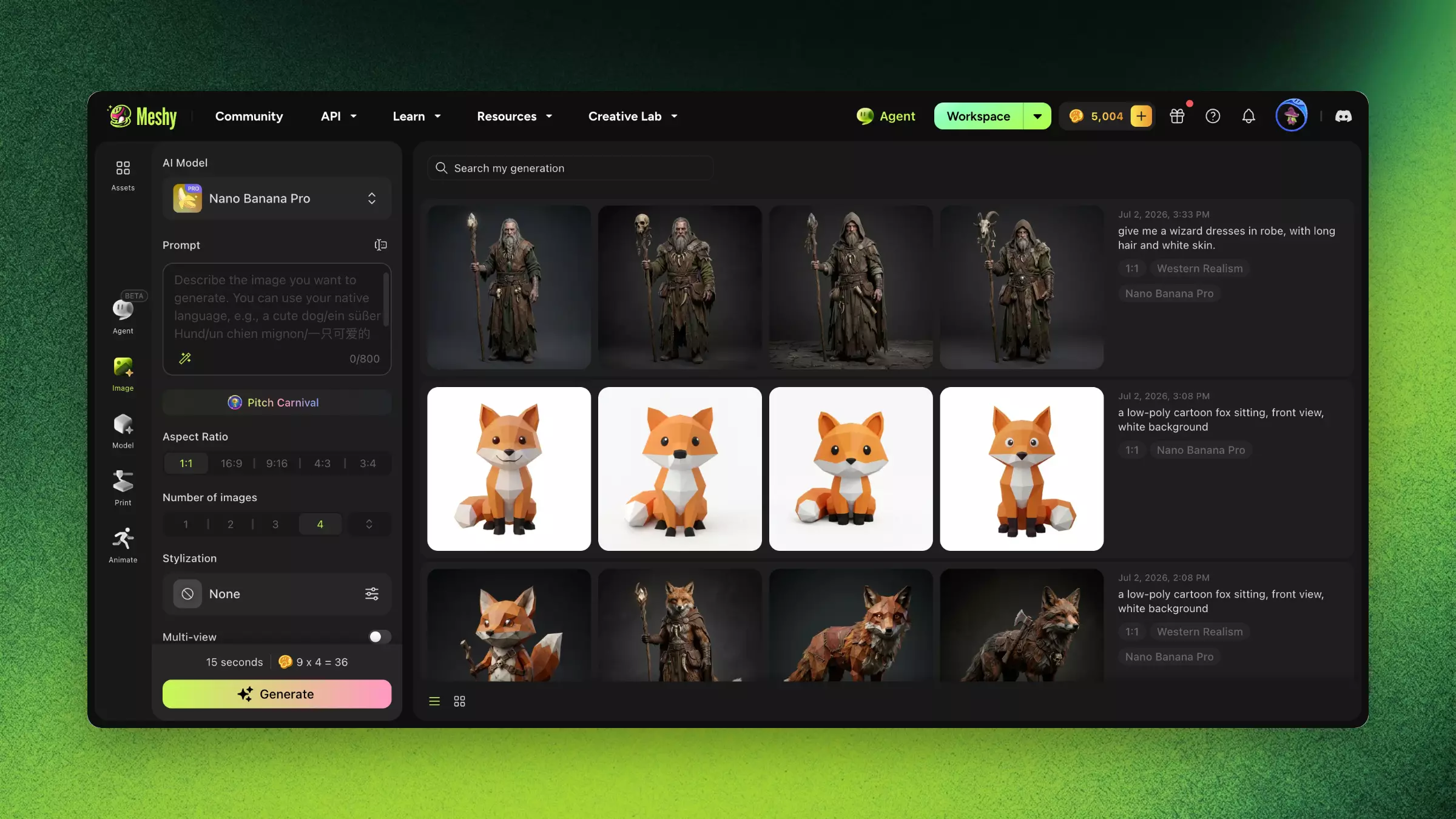
Enter the Image module → AI Image Generation.
-
Enter a description (e.g., "a low-poly cartoon fox sitting, front view, white background").
-
Select a style preset (e.g., Realistic, Anime, Chibi).
-
Click Generate and wait.
-
Choose the best result from multiple candidates.
-
Click "Send to Image to 3D" to enter the 3D generation pipeline directly.
Prompting Tips for 3D-Optimized Images
-
Specify "front view" or "3/4 view" for the best 3D conversion angle.
-
Add "white background" or "clean background" to reduce interference.
-
Describe the complete form (don't just describe the head — describe the entire object).
-
Avoid overly complex scenes — single subjects produce the best results.
FAQ
- How do I generate an image from text in Meshy?
- Open the Image module, go to AI Image Generation, enter a description, pick a style, generate, then send the result to Image to 3D.
- What's the difference between AI Image Generation and Text to 3D?
- AI Image Generation creates a 2D image first for precise visual control before converting to 3D; Text to 3D goes directly from text to model.
- How do I write prompts for 3D-ready images?
- Specify a front or 3/4 view, add white background, describe the full object, and keep it to a single subject.
- What image styles can Meshy generate?
- Presets include Realistic, Anime, Chibi, and more, optimized for clean conversion into 3D.
- Can I send a generated image directly to Image to 3D?
- Yes. Click Send to Image to 3D to move your chosen image straight into the 3D pipeline.
Related Links
-
Image to 3D — Convert generated images to 3D
-
Prompting Guide — Master the art of writing effective prompts
-
3D Agent — Explore concepts through conversation before generating images