Animation
Auto-rig humanoid and quadruped characters and apply 500+ animation presets, then export rigged FBX or GLB for Unity, Unreal, and Blender pipelines.
TL;DR
-
Auto-rigs humanoid/quadruped characters and applies animation presets.
-
500+ built-in animation presets across categories: walk & run, body movements, daily actions, fighting moves, and more.
-
Exports rigged and animated models as FBX or GLB, compatible with Unity/Unreal/Blender.
When to Use
-
You have a 3D character and need rigging + animation in one step.
-
You want to quickly apply standard motion clips (idle, walk, run, attack, etc.) without manual keyframing.
-
You need to preview how a character reads in motion before committing to a full animation pipeline.
When NOT to Use
-
You need custom choreographed motion not covered by presets → Export the rigged FBX, then animate manually in Blender/Maya or retarget Mixamo animations.
-
You need cinematic-level precise animation with facial expressions → Manually create in Maya/Blender.
-
The character has a non-standard body plan that auto-rig cannot recognize.
Step-by-Step
-
Select a model (T-pose or A-pose recommended for best rigging results).
-
Enter the Animate module.
-
Auto-rig is applied automatically (humanoid or quadruped skeleton).
-
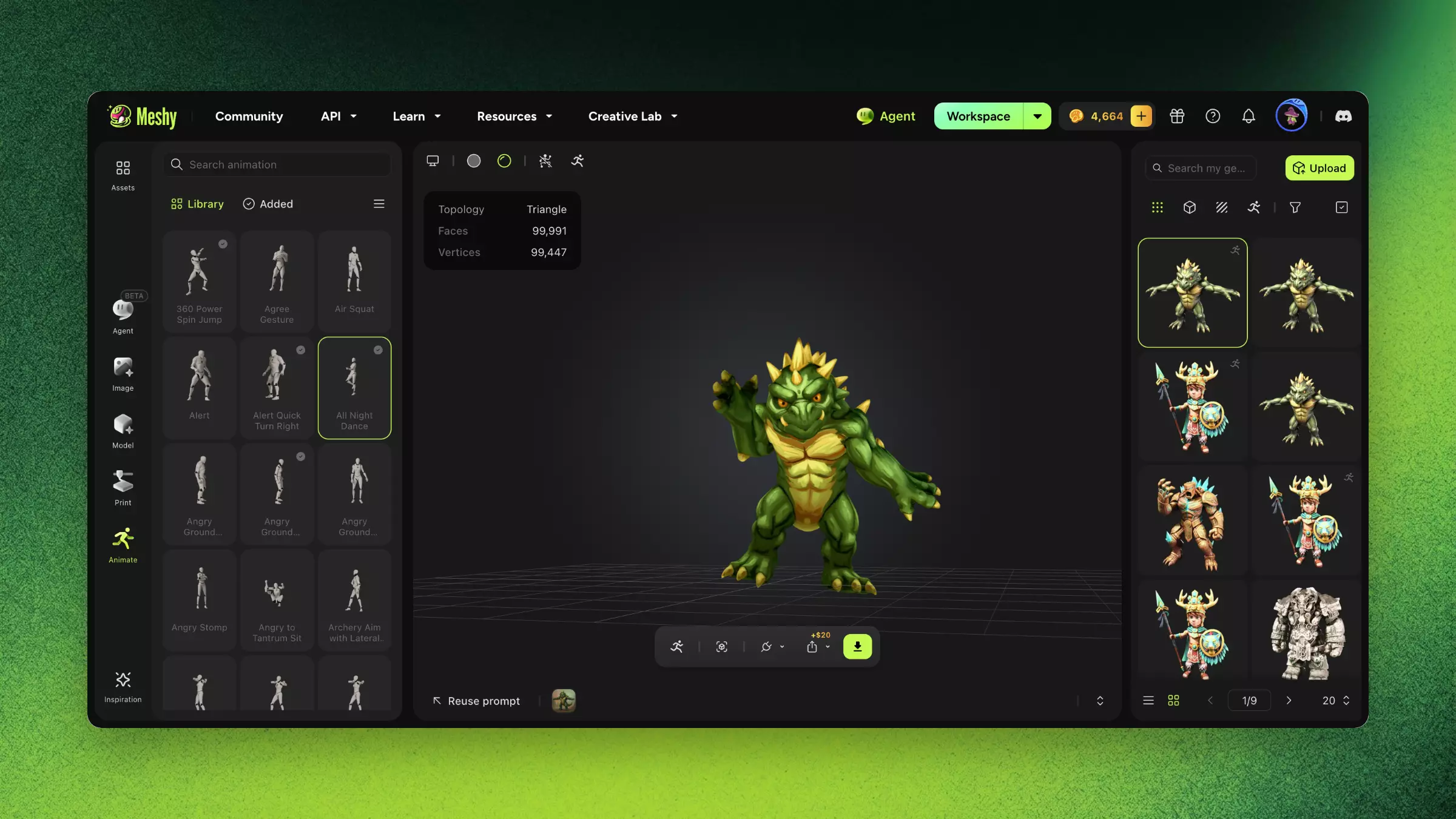
Browse the animation preset library (500+ presets) and select the desired motion.
-
Preview the animation in 3D viewer.
-
Add multiple animation clips if needed.
-
Export as FBX (with skeleton + animation data) or GLB.
Tips
-
Generate characters in T-pose or A-pose for the most accurate auto-rig results.
-
For custom animations beyond the preset library, export the rigged FBX and retarget Mixamo clips or author custom keyframes in Blender's Action Editor.
FAQ
- How do I animate a 3D character in Meshy?
- Open the Animate module, let auto-rig run, browse the 500+ preset library, pick a motion, preview it, and export.
- How many animation presets does Meshy have?
- Over 500 presets across walk & run, body movements, daily actions, fighting moves, and more.
- Can I animate a model I made outside Meshy?
- Yes. You can upload an existing model for rigging and animation — T-pose or A-pose works best.
- What formats can I export animated models in?
- FBX (with skeleton and animation data) or GLB, compatible with Unity, Unreal, and Blender.
- Can I create custom animations not in the library?
- For custom motion, export the rigged FBX and author keyframes or retarget Mixamo clips in Blender or Maya.