Meshy for 3ds Max
Run the Meshy plugin script in 3ds Max so you can send models from the Meshy web app straight into your 3ds Max scenes.
Before you begin
-
Download the plugin, a
.zipfile, from the Meshy for 3ds Max integration page. -
You need a Meshy account. To send models with the bridge, you need a Pro plan or higher.
Install the plugin
To install the plugin, follow these steps:
-
Unzip the file to a folder on your computer.
-
In 3ds Max, click Scripting > Run Script.
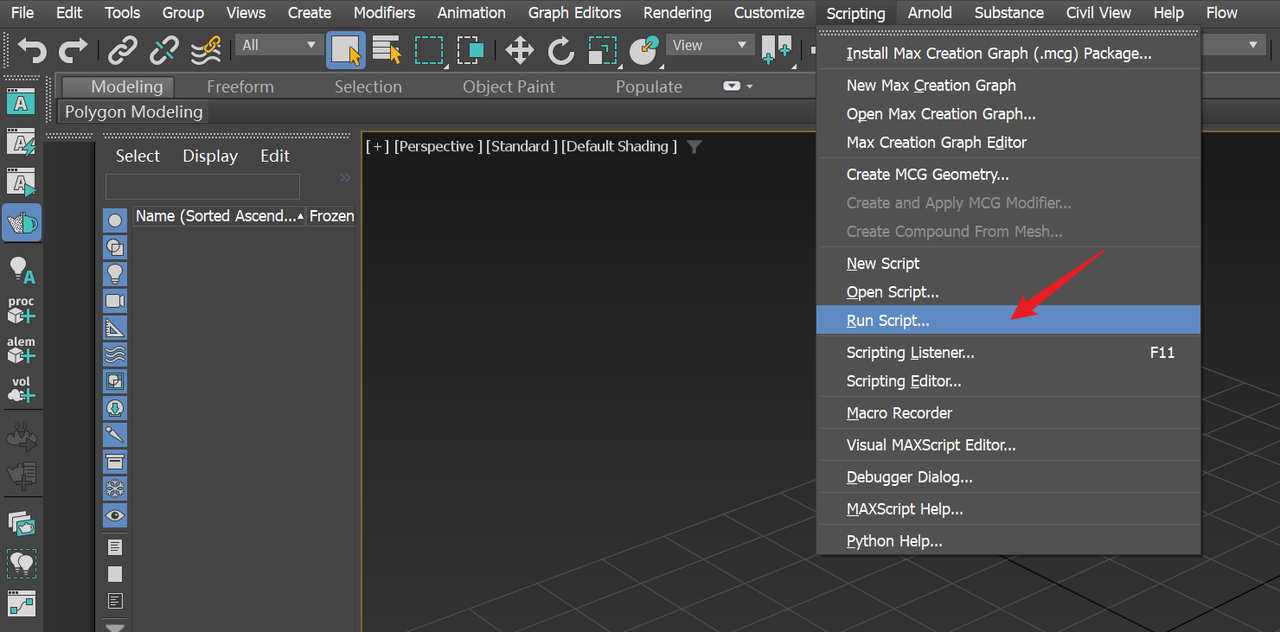
-
Select
3dsmax_meshy_bridge.pyin themeshy-3dsmax-pluginfolder you unzipped.
The Meshy Bridge for 3ds Max window opens. You use it to receive models.
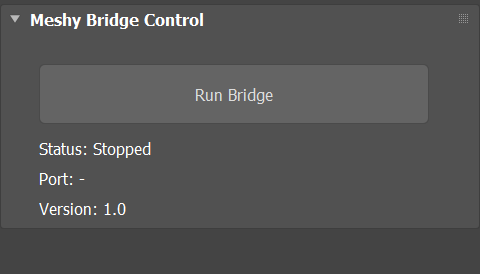
The script doesn't add a menu to 3ds Max. To open the window in a later 3ds Max session, run the script again.
Next steps
-
To send your first model from Meshy to 3ds Max, see Bridge to 3ds Max.
-
To import a rigged character with its animation, see Animated models.