Meshy for Blender
Install the Meshy plugin in Blender so you can send models from the Meshy web app into your scene and prepare them for 3D printing.
Before you begin
-
Download the plugin, a
.zipfile, from the Meshy for Blender integration page. Don't unzip it. Blender installs the plugin from the.zipfile. -
You need Blender 4.2 or later.
-
You need a Meshy account. To send models with the bridge, you need a Pro plan or higher.
Meshy tested the plugin with Blender 4.2.6, 5.0.1, 5.1.0, and 5.2.0.
The plugin doesn't need an API key or a sign-in. You generate and texture models in the Meshy web app, and the plugin receives them in Blender.
Install the plugin
To install the plugin, follow these steps:
-
In Blender, click Edit > Preferences.
-
In the Preferences window, click Add-ons.
-
At the top of the add-on list, click the drop-down arrow.
-
Click Install from Disk.

-
In Blender File View, select the
.zipfile you downloaded. -
Click Install from Disk.

-
In the add-on list, search for
Meshy. -
Make sure the plugin's checkbox is selected.
-
In the 3D viewport, press
Nto open the sidebar. You can also click the small arrow at the edge of the viewport.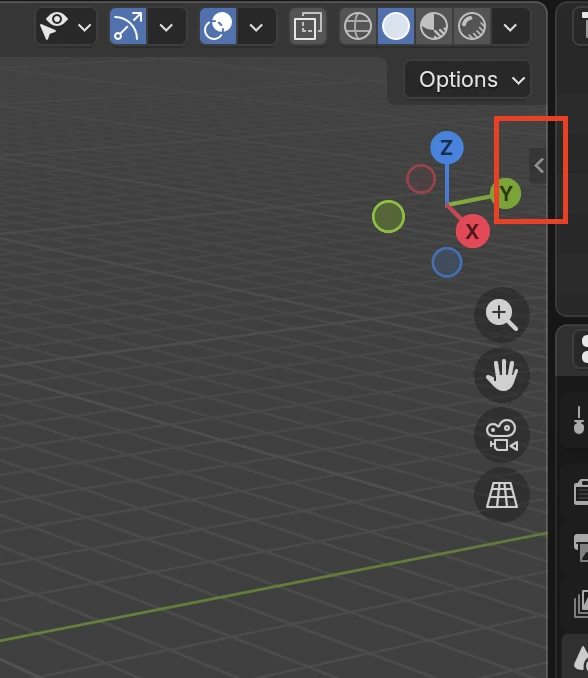
-
Click the Meshy tab.
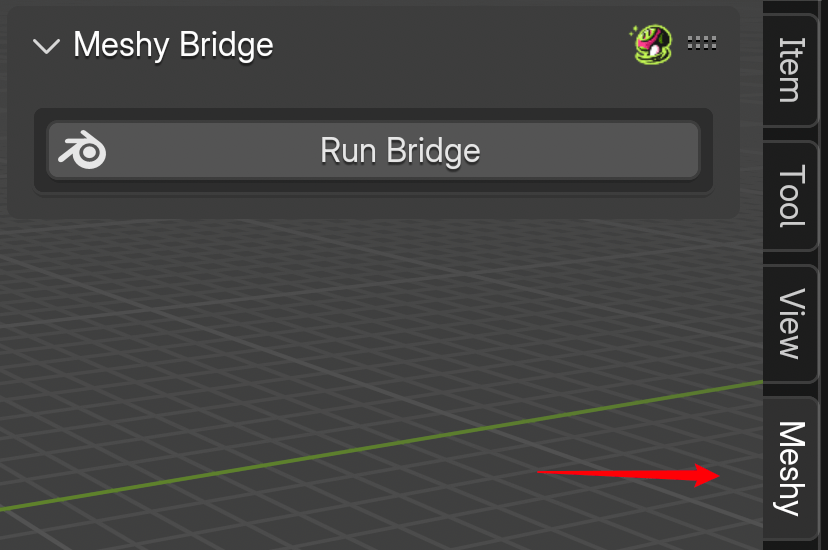
You can also install the plugin by dragging the .zip file into the Blender viewport.
Plugin panels
The Meshy tab has the Meshy Bridge panel and four panels that prepare a model for 3D printing. Its Help & Settings panel opens the plugin's user guide in English or Chinese.
Bridge to Blender
Meshy Bridge receives the models you send from the Meshy web app and imports them into the open scene, with their materials and vertex colors. To set it up, see Bridge to Blender.
Model analysis
Analyze measures volume and surface area. It also checks the mesh for problems that make a 3D print fail, such as holes, self-intersections, thin walls, and overhangs. To run the checks, see Model analysis.
Model cleanup
Clean Up repairs the mesh with Make Manifold, which fills holes, deletes loose and interior geometry, and makes the normals point outward. Its Delete Small Pieces tool removes scattered fragments. To repair a model, see Model cleanup.
Model editing
Edit hollows a model, rotates it so chosen faces sit flat with Align XY, and scales it to a target volume or length. To change a model, see Model editing.
Model export
Export saves the selected objects as STL, OBJ, or PLY files, with options for UVs, normals, vertex colors, and textures. To export a model, see Model export.
Prepare a model for 3D printing
To prepare a model for 3D printing, follow these steps:
-
Send the model from Meshy to Blender with Meshy Bridge.
-
In the Analyze panel, click Check All to find problems.
-
In the Clean Up panel, fix the problems.
-
In the Edit panel, set the model's size and orientation.
-
In the Analyze panel, click Check All again to confirm the fixes.
-
In the Export panel, export the model as an STL file.
Troubleshooting
The following table lists common problems, their causes, and how to fix them.
| Problem | Cause | Fix |
|---|---|---|
| The sidebar has no Meshy tab | The plugin is installed but turned off. | In Edit > Preferences > Add-ons, search for Meshy, and select the plugin's checkbox. |
| The Meshy tab shows Meshy Login or Text To Texture | An older version of the plugin is installed. | Download the plugin from the Meshy for Blender integration page, and install it again. |
Next steps
-
To send your first model from Meshy to Blender, see Bridge to Blender.
-
To check a model for 3D printing problems, see Model analysis.
-
To import a rigged character with its animation, see Animated models.